

Honey Saxena
Digital Marketing Expert
How to Integrate AI With Your Real Estate ERP and CRM
Published June 27, 2026|10 min read
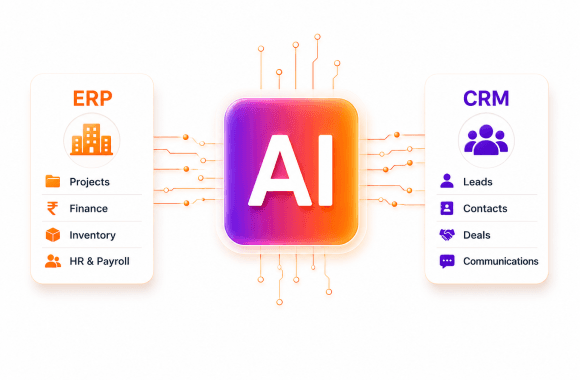
This guide explains how to integrate AI with your real estate ERP and CRM the right way, following a connect, clean, automate sequence. It covers which systems AI links to, from Yardi and MRI to Salesforce, compares native, API, and integration-platform methods, and flags why projects fail. Backed by data from McKinsey and integration specialists, it gives a staged plan and a realistic budget view. The goal is to help firms build the data foundation that makes AI actually deliver.
To integrate AI with your real estate ERP and CRM, connect your systems through APIs or an integration platform, clean and centralize the data, then layer AI on top of that unified source. The goal is one reliable flow where lease, tenant, and payment data moves between systems like Yardi, MRI, RealPage, and Salesforce automatically. Get that foundation right and AI works. Skip it and AI fails on messy, disconnected data.
This is the step most firms underestimate. They buy an AI tool, point it at scattered systems, and wonder why the results disappoint. AI is only as good as the data feeding it, and in real estate that data lives in your ERP and CRM. I have untangled plenty of these setups, and the pattern is always the same: the integration work, not the AI itself, decides whether the project succeeds. This guide shows you how to do it right.
Why integrate AI with your real estate ERP and CRM?
You integrate AI with your ERP and CRM so it can act on complete, real-time data instead of stale snapshots. When systems connect, lease and tenant data flows automatically, dashboards update instantly, and AI can predict, price, and automate across your whole portfolio. Integration matters because disconnected data is the top reason AI projects stall.
The payoff is concrete. Leasing and finance teams get immediate access to tenant and lease data for onboarding and renewals. Rent and payment data syncs without manual entry. McKinsey reports firms gaining 10% or more in net operating income from AI-driven operations, and that gain depends on AI seeing the full picture. A connected stack is what makes that possible.
How do you integrate AI with a real estate ERP and CRM?
You integrate AI by connecting your systems, unifying the data, then deploying AI against that single source of truth. The sequence matters: connect first, clean second, automate third. Trying to run AI before the data is unified is the most common and costly mistake in real estate technology projects.
Here is the integration process step by step:
Map your data: List every system holding lease, tenant, and financial data.
Connect the systems: Use APIs or an integration platform to link ERP and CRM.
Clean and unify: Standardize formats and remove duplicates into one source.
Deploy AI: Point your AI tools at the unified data layer.
Monitor and maintain: Keep integrations and data quality healthy over time.
The clean-and-unify step is where most budgets go. Data preparation alone can be 30% to 50% of an AI project's cost, because real estate data is scattered and messy. Budget for it upfront and the rest of the project runs smoothly.
Which systems does AI integrate with in real estate?
AI integrates with the major real estate ERPs and CRMs, including Yardi, MRI Software, RealPage, AppFolio, Buildium, and Entrata on the property side, plus Salesforce and HubSpot on the CRM side. Most modern AI platforms offer native connectors or API access to these systems. Wide compatibility means you rarely need to replace your core software to add AI.
These are the systems AI commonly connects to:
Property management ERPs: Yardi, MRI, RealPage, AppFolio, Entrata, Buildium.
CRMs: Salesforce, HubSpot, and multifamily-specific tools like Funnel Leasing.
Accounting systems for AP automation and three-way match.
Document storage for lease abstraction and records.
Market data providers for pricing and underwriting.
Some CRMs are built for this. Funnel Leasing, for example, offers native integration with Yardi, RealPage, and Entrata, syncing leasing and resident data across platforms. Check native connectors first, since they are faster and cheaper than custom builds. Our AI integration services and real estate AI resources map your options.
ERP and CRM integration methods compared
There are three main ways to connect AI to your systems, each with trade-offs. The table below helps you pick.
Method | How it works | Best for | Trade-off |
Native connector | Prebuilt link from the AI tool | Common systems like Yardi | Limited to supported fields |
Direct API | Custom code to each system's API | Specific, controlled needs | More build and upkeep |
Integration platform (iPaaS) | Middleware like MuleSoft links all | Complex, multi-system stacks | Platform subscription cost |
For most firms, native connectors handle the common cases, while an integration platform makes sense when you have many systems to unify. Tools like MuleSoft can ingest tenant and lease data from Yardi or MRI into Salesforce for real-time onboarding, per Fortimize.
What makes AI integration projects fail?
AI integration projects fail mostly because of dirty, disconnected data and no clear owner. When data lives in silos with different formats, AI cannot act on it reliably. The fix is unifying and cleaning data before deployment, not after. Integration is a data problem first and a technology problem second.
Other failure points are predictable: underbudgeting the data work, ignoring ongoing maintenance, and weak security on sensitive tenant data. Compliance, integration upkeep, and scaling can add 20% to 30% to a baseline budget. Assign one accountable owner, budget for the data layer, and plan for maintenance from the start. Those three moves prevent most failures.
How do you plan a successful integration?
Plan a successful integration by starting with a data audit and a single high-value workflow, not a big-bang connect-everything project. Map where your data lives, fix the worst quality issues, and connect the systems that feed your first AI use case. This staged approach works because it proves value before you wire up the entire stack.
Use these planning rules:
Audit your data sources and quality before buying anything.
Connect only the systems your first use case needs.
Use native connectors where they exist to save cost.
Budget 30% to 50% of the project for data preparation.
Assign one owner accountable for integration and data health.
Skip the temptation to integrate everything at once. A focused first connection teaches you what works and de-risks the broader rollout.
The bottom line on integrating AI with your ERP and CRM
The key takeaway is that successful AI in real estate depends on integration, connecting your ERP and CRM, unifying the data, then deploying AI on a single source of truth. The integration and data work, not the AI tool, decides whether the project delivers.
Your next step is to audit where your lease, tenant, and financial data lives today and rate its quality. That audit tells you exactly how much data work stands between you and working AI, and it shapes a realistic budget and timeline.
Do not let a slick AI demo rush you past the foundation. Connect first, clean second, automate third. Use native connectors where you can, budget honestly for the data layer, and assign one owner to keep it healthy. Do that and your AI will run on complete, real-time data, which is the whole point. Ready to connect your stack? Explore our AI integration services and book a strategy call.
- AI in real estate only works when your ERP and CRM data are connected and clean.
- Follow the sequence: connect systems, unify data, then deploy AI.
- AI integrates with Yardi, MRI, RealPage, AppFolio, Entrata, Salesforce, and HubSpot.
- Data preparation is often 30% to 50% of the total project cost.
- Native connectors are cheapest; integration platforms suit complex stacks.
- Dirty, siloed data and a lack of clear ownership are the top reasons projects fail.
- Tools like MuleSoft can auto-sync Yardi or MRI data into Salesforce.
- Start with one high-value workflow, not a big-bang connect-everything project.
Why trust Noseberry
Our content is written by practicing real-estate and PropTech professionals, fact-checked by a dedicated editorial team, and reviewed against the latest industry data before publication.
- 10+ years of industry expertise
- All facts independently verified
- No sponsored rankings in guides
- Updated when the industry changes
Frequently Asked Question
How do I integrate AI with my real estate ERP and CRM?
Integrate AI by connecting your systems through APIs or an integration platform, unifying and cleaning the data, then deploying AI against that single source of truth. Connect first, clean second, automate third. The data preparation step is the largest, often 30% to 50% of the project, so budget for it before you start.
Which real estate systems does AI integrate with?
AI integrates with major property ERPs like Yardi, MRI, RealPage, AppFolio, Entrata, and Buildium, plus CRMs like Salesforce, HubSpot, and Funnel Leasing. It also connects to accounting systems, document storage, and market data providers. Most modern AI platforms offer native connectors or API access, so you rarely need to replace your core software.
Do I need to replace my ERP or CRM to add AI?
No, you usually do not need to replace your ERP or CRM to add AI. Most AI tools connect to existing systems through native connectors or APIs. The work is in connecting and cleaning your data, not swapping software. Replacing core systems is expensive and rarely necessary just to enable AI capabilities.
What is the hardest part of AI integration in real estate?
The hardest part is unifying and cleaning scattered data. Real estate data lives in silos with different formats, and AI cannot act on it reliably until it is centralized. Data preparation often consumes 30% to 50% of project cost. This is why disconnected, dirty data is the top reason AI integration projects stall.
What integration method should I use for AI?
Use native connectors for common systems like Yardi, direct APIs for specific controlled needs, and an integration platform like MuleSoft when you must unify many systems. Native connectors are fastest and cheapest, so check those first. An integration platform makes sense for complex, multi-system stacks where custom code would be hard to maintain.
Related insights
 Real Estate
What should a PMS do for small-scale property managers?
The ideal PMS for a small-scale property manager (typically 10 to 500 units) should do ten things well: capture every rent payment automatically, log every maintenance ticket with photo evidence and vendor dispatch, hold every tenant lease and document in one searchable place, generate owner and investor statements in one click, run automated rent reminders and late-fee escalation, screen tenants with credit and eviction history, sync with the operator's accounting stack (QuickBooks, Xero), work on mobile so field checks and unit walks happen on a phone, integrate with a website for listing marketing and online applications, and produce broker-visible dashboards that let the manager see occupancy, delinquency, and cash flow at a glance. AppFolio Property Manager Core, Buildium, DoorLoop, Rentec Direct, and Hemlane are the platforms most adopted at this scale in 2026, at $1.40 to $4 per unit per month. This post covers what the ideal PMS should do, which platforms actually deliver it, and how to pick without overpaying.
August 22, 2026 Real Estate
Which AI tools work best for real estate developers in 2026?
The best AI tools for real estate developers in 2026 fall into eight categories that map to the developer lifecycle: land sourcing and site selection (Cherre, Reonomy, HouseCanary, LandGate), feasibility and financial modelling (Northspyre, TestFit, custom Excel plus GPT), design and architectural planning (Autodesk Forma, Higharc, Cove.tool, Snaptrude), construction management and progress tracking (Procore AI, Autodesk Construction Cloud, Buildots, Doxel, OpenSpace), pre-launch marketing and renders (Restb.ai, MidJourney, Adobe Firefly), off-plan sales CRM (Salesforce, HubSpot, Follow Up Boss, Rechat), ESG and net-zero analytics (Measurabl, Enertiv, Aquicore), and handover to operations (BIM AI, tenant portal AI). Used well, they cut construction cost 10 to 20 percent, compress design cycles 30 to 50 percent, and lift off-plan sales conversion 20 to 40 percent. Used badly, they burn subscription budget and produce plans that do not build. This post walks through each category, which tools actually work, and how to sequence adoption.
August 22, 2026 Real Estate
ADA & WCAG Accessibility Compliance for Real Estate Websites: What Operators Must Fix Before They Get Sued
This blog breaks down ADA and WCAG accessibility compliance for real estate websites, focused on what actually creates legal exposure. It explains why WCAG 2.1 Level AA has become the practical legal standard even without a formal Title III regulation for private businesses. It walks through the six accessibility failures responsible for 96% of all detected errors across the web, using real listing-page examples. It also warns against relying on accessibility overlay widgets, citing the FTC's 2025 action against accessiBe over deceptive compliance claims. The piece closes with a step-by-step audit process, an in-house versus compliance-partner comparison, and a 10-question FAQ section.
August 20, 2026
Ready to book a 30-minute strategy call?
We'll map the right digital moves for your real estate business, no pitch deck, no commitment.